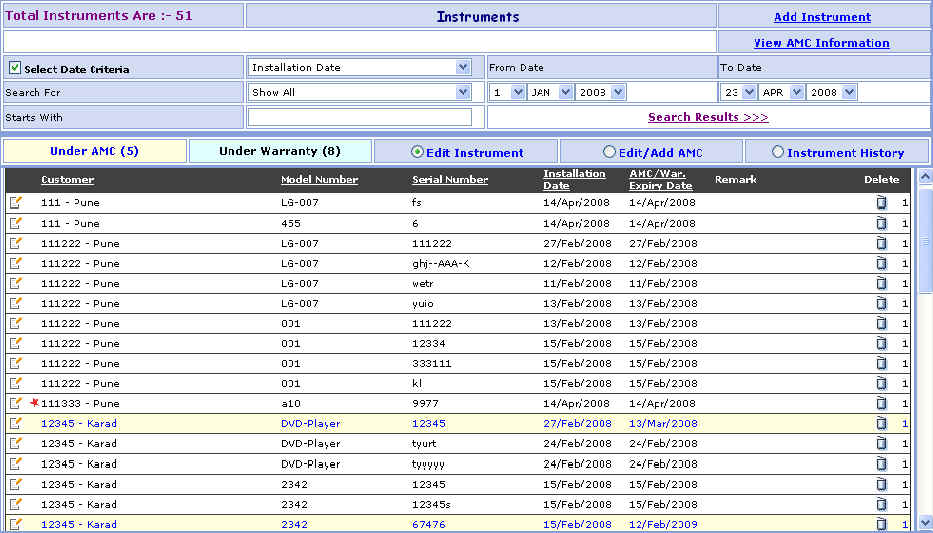
Instrument Search
This page Shows List of Instruments depending on different search criteria
selected by user such as Customer Name, Principal Name, Model Number,
Serial
Number, AMC Wise, Warranty Wise, Key Customer Instrument, All (Simple,
Main, Sub) Instrument Wise, (Installation, Warranty Expiry, AMC Expiry) Date
Wise.
You can go to Instrument Search screen in following way:
1- Go to Homepage and click on Instrument Button located at the top of the page.
>>Want to Create New Instrument?
1-Click on the Add Instrument link that is seen at the right corner of the page, open the New Instrument screen.
>>Want to see AMC Information?
1- Click on the View AMC Information link that is seen at the right corner of the page, open the AMC Information screen.
>>Want to Search record of Particular Instrument?
Suppose you want the details of a Instrument e.g. LG-007 (Model Number). Here are the steps to follow:
1- In the Search for box select Model Number and in the Starts With box enter Model Number ex- LG-007.2- Select Date Criteria (Installation, Warranty Expiry, AMC Expiry) Wise Select From Date & To Date.
3- Click on Search Results >>> link.
4- The Instrument brief information appears in grid.
>>Want to Modify Instrument Information?
Suppose you have entered the Wrong Instrument Information e.g.
LG-007 (Model Number) by mistake.
Don't worry, here's the solution.
Just follow below steps:
 Edit Instrument Option.
2- In the grid below, you will find the LG-007 Instrument. Just click on the
Edit
( )
button besides it.
)
button besides it.
3- You will see the details of LG_007 Instrument Information.
4- Change the LG-007 Instrument Information and click on Save button. ORClick on Save & New button to save the Instrument and clear all the fields to enter New Instrument.
5- Click on Cancel button to cancel the Instrument and clear all the fields to enter New Instrument.
>>Want to Delete Instrument?
1- Click on the Delete ( )
button beside the Instrument that you want to delete.
)
button beside the Instrument that you want to delete.
>>Want to Add or Modify AMC Information?
Suppose you Want to Add or Modify the AMC of Reliance Customer.
1- First Select the
Edit/Add AMC Option.
2- In the grid below, you will find the Reliance Customer. Just click on
the (Edit)
button besides it,
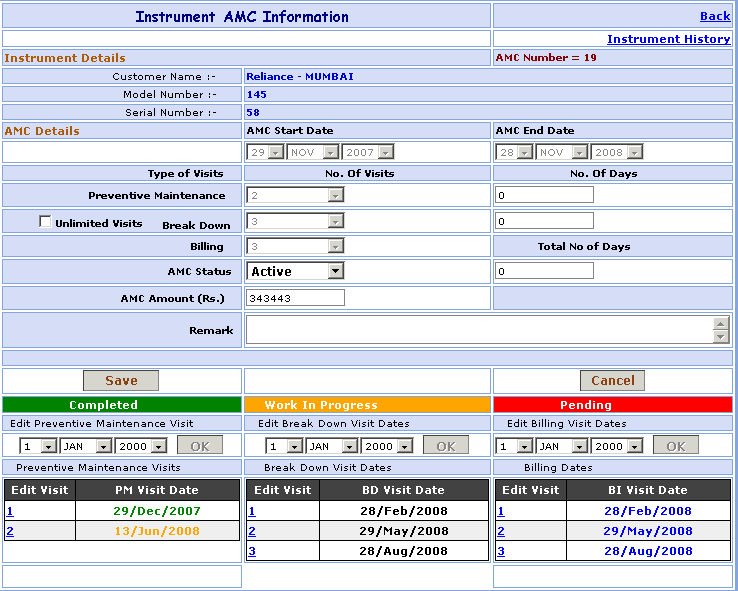
Open the AMC Master screen.
>>Want to see Instrument History?
1- Click on the Instrument History link that is seen at the right corner of the page, open the Instrument History screen.
>>AMC Information:
1- Select AMC Start Date (DD, MM, YYYY) & AMC End Date (DD, MM, YYYY).
2- Select the No. of Preventive Maintenance Visits & Needed enter the corresponding No. of Days in the corresponding box adjacent to it.
3- You want to Unlimited Visits of Break Down select the  Unlimited Visit combo box.
4- Select the No. of Break Down Visits & Needed enter the corresponding No. of Days in the corresponding box adjacent to it.
5- Select the No. of Billing Visit.
6- Select AMC Status (Active or Terminated).
7- Total No. of Days for Preventive Maintenance & Break Down visit can be manually enter by the user.
8- Enter the AMC Amount in Rupees.
9- Enter the Remark.
>>Want to save AMC Information?
Follow the steps given below:
2- Click on Save button to save AMC Information.
3- Click on Cancel button to cancel the AMC Information and clear all the fields to enter New AMC Information.
4- Click on Back link, go to the Instrument Search Screen.
>>Want to see Instrument History?
Suppose you Want to see the Instrument History of Reliance Customer.
1- First Select the
Instrument History Option.
2- In the grid below, you will find the Reliance Customer. Just click on
the (Edit)
button besides it,
Open the Instrument History screen.
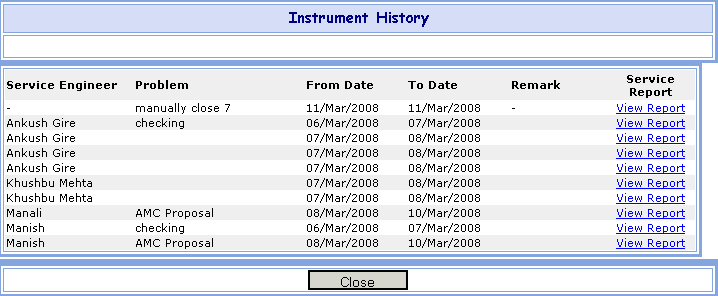
>>Want to see Service Report?
Suppose you Want to see the Service Report of Manish Service Engineer.
1- In the grid below, you will find the Manish Service Engineer. Just click on
the View Report link besides it,
Open the Service Report screen.