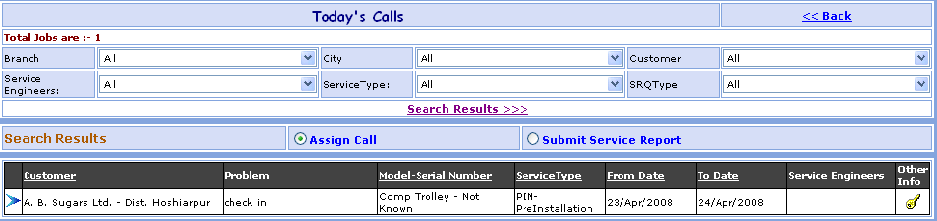
Today's Calls Search
This page Shows List of Calls manage &
not manage depending on different search criteria
selected by user such as Branch, City, Customer Service
Engineer,
Service Type, SRQ Type wise search call.
You can go to Today's Calls Search Screen in following way:
1- Go to Homepage and click on Call Management button located at the top of the page.2- Click on View Today's Call link at the top-right corner of the page, open the New Today's Calls screen.
Suppose you want the details of a Customer e.g. Reliance. Here are the steps to follow:
1- Call can be searched by selecting Branch, City, Customer, Service Engineer, Service Type, SRQ Type.2- Click on Search Results >>> link.
3- The Today's Call brief information appears in grid.
4- Click on << Back link, go to the Call Management Search screen.
>>Want to Add or Modify Assign Call?
Suppose you want to Add or Modify the Assign Call of Reliance Customer.
1-First Select the Assign Call.
2-In the grid below, you will find the Reliance Customer. Just click on
the  (Edit)
button besides it,
(Edit)
button besides it,
Open the Call Assign screen.
>>Want to Submit Service Report?
Suppose you want to Submit Service Report of Reliance Customer.
1- First Select the Submit
Service Report.
2- In the grid below, you will find the Reliance Customer. Just click on
the (Edit)
button besides it,
Open the Submit Service Engineer Report.