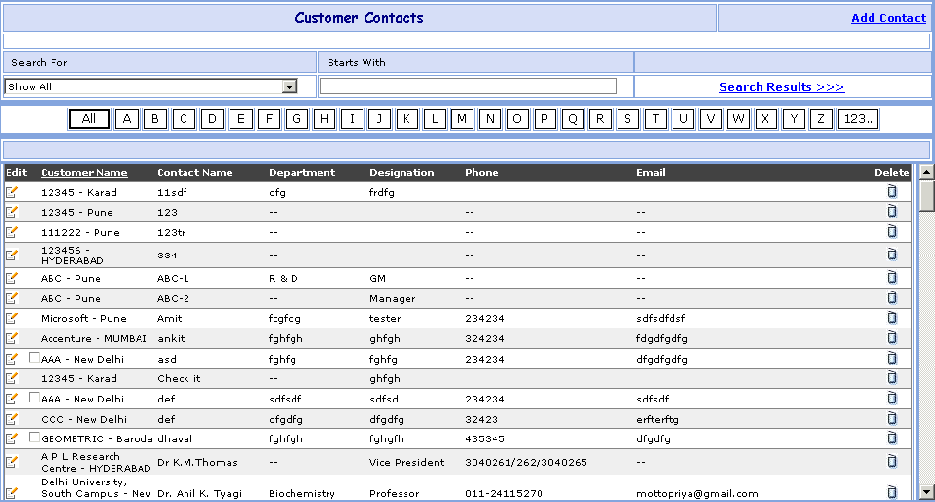
Contact Search
This page is used to fill the Contact details of the customer.
You can go to Contact Search Screen in following way:
1- Go to Homepage and click on Contact Button located at the top of the page.
>>Want to Create New Contact?
1- Click on the Add Contact link that is seen at the right corner of the page, open the New Contact screen.
>>Want to Search record of Particular customer or Contact person in that company?
Suppose you want the details of a Customer e.g. Reliance. Here are the steps to follow:
1- In the Search for box select Customer Name (or Contact Dept or Contact Name to search for particular person) and in2- Click on Search Results >>> link.
3- Search Mukesh Contact click on 'M' button.
4- Search ALL Contact click on 'All' button.
5- The Customer's brief information appears in grid.
6- If you want to see all the information , then click on the Edit
( ) button besides it.
>>Want to Modify Contact Information?
Suppose you have entered the Wrong Contact
(Customer) Information e.g. Mukesh (Reliance) by mistake.
Don't worry, here's the
solution. Just follow below steps:
) button
besides it.
2- You will see the details of Mukesh Contact (Reliance Customer) information.
3- Change the Mukesh Contact (Reliance Customer) information and click on Save button. ORClick on Save & New button to save the Contact and clear all the fields to enter New Contact.
4- Click on Cancel button to cancel the Contact and clear all the fields to enter New Contact.
>>Want to Delete Contact ?
1- Click on the Delete ( )
button beside the Contact Name that you want to delete.
)
button beside the Contact Name that you want to delete.