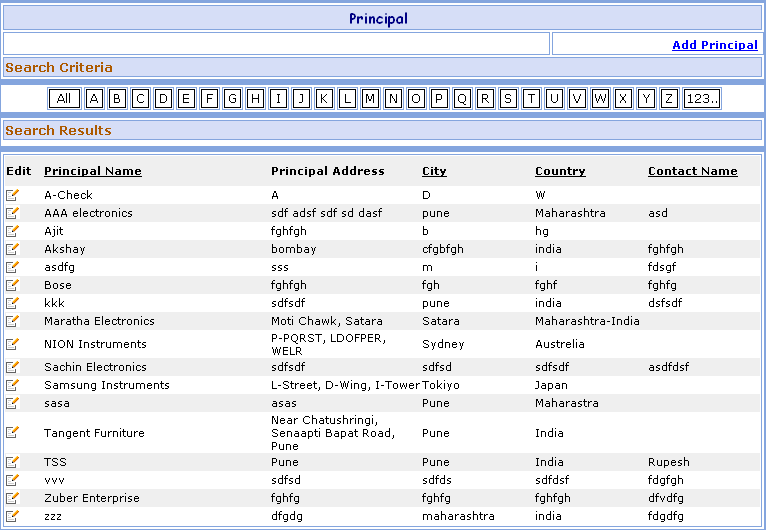
Principal Search
You can enter Principal (Supplier) names from
this master screen. Principal are the people from whom you purchase the material
and
deliver it to your customers.
1- Go to Homepage and click on Administration link located at the top of the page.
2- Click on the Principal link that is seen at the left side of the page.
>>Want to Create New Principal?
1- Click on the Add Principal link that is seen at the right corner of the page, open the New Principal screen.
>>Want to Search record of Particular Principal?
Suppose you want the details of a Principal e.g. TSS. Here are the steps to follow:
1- Search TSS Record Click on 'T' button.2- Search ALL Record Click on 'All' button.
>>Want to Modify Principal Information?
Suppose you have entered the Wrong Principal Information e.g.
TSS by mistake.
Don't worry, here's the solution.
Just follow below steps:
 ) button besides it.
2- You will see the details of TSS Principal Information.
3- Change the TSS Principal Information and click on Save button. ORClick on Save & New button to save the Principal and then enter New Principal.
4- Click on Cancel button to cancel the Principal and clear all the fields to enter New Principal.