Customer Master
>>Customer screen fields:
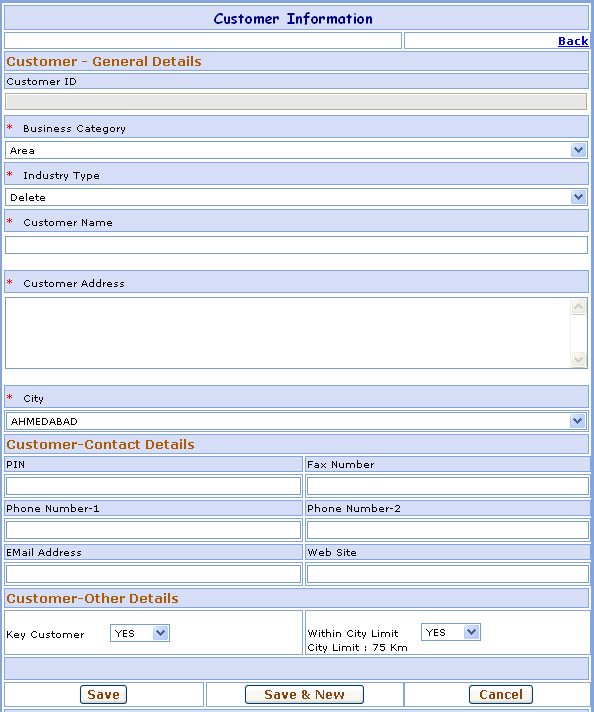
1- Go to Homepage and click on Customer link located at the top of the page.2- Click in Add New Customer link at the top-right corner of the page, open the New Customer screen.
>>Customer Information:
Suppose you want to add the Customer Reliance in your database which is not present. Here are the steps to follow:1- Select Business Category, Industry Type of Customer.
2- Enter the Customer Name. ex.- Reliance
3- Enter the Address of Customer.
4- Select the City where the Customer belongs to.
5- Enter the PIN Code, Fax Number of Customer.
6- Enter the Phone details of Customer, you can enter two Phone Numbers.
7- Enter the Email Address & Web Site of Customer.
8- Select Key (Important) Customer & Within City Limit of Customer.
Field marked with * are compulsory.
>>Want to save Customer Information?
Follow the steps given below:
2- Click on Save button to save Customer. OR
Click on Save & New button to Save the Customer and clear all the fields to enter New Customer.3- Click on Cancel button to Cancel the Customer and clear all the fields to enter New Customer.
4- Click on Back link, go to the Customer Search Screen.